Pimapata – sales and views analytics for Cults3D sellers
Pimapata shows how your Cults3D shop is doing over time: sales, income and payouts, the daily views, likes and downloads of every design, which designs sell and which are seen but rarely bought – and what to do next. I built it for my own shop of scale-model parts, and now every Cults3D designer can use it.
Think of it as a statistics dashboard and sales tracker for Cults3D designers, creators and shops – for everyone selling STL files who wants more than the totals Cults3D shows.
Read-only: Pimapata never changes anything in your shop. Independent app, not affiliated with or endorsed by Cults3D.
What Pimapata shows
-
Sales, income and payouts
Every sale with price, VAT, Cults3D's commission and your income; sales per day, week and month against the period before; what is available for payout and what is still under validation.
-
Views, likes and downloads per design
Cults3D only shows today's totals. Pimapata records them every day, so you see the history of each design: views gained, sales per 1,000 views, and the days its price or discount changed.
-
Insights
A 30-day forecast, the opportunity matrix (stars, designs to promote, listings to improve), rising and fading designs, the launch curve of new designs, buying times, categories and tags, and price changes with the sales before and after.
-
Tag search ranking
Once a week Pimapata searches Cults3D for your designs' tags like a buyer and shows where each design appears – top 10, top 100 or hard to find – plus a tag check for missing and misspelt tags.
-
Actions
A short to-do list from your own data: listings to improve, designs to promote, designs fading or gone quiet, slow launches – and 30 days later a check of what happened.
-
Year report and CSV
Income, VAT and commission per year and month with a CSV for your spreadsheet or tax adviser. Install Pimapata on your phone and get a push notification when new sales arrive.
A look inside
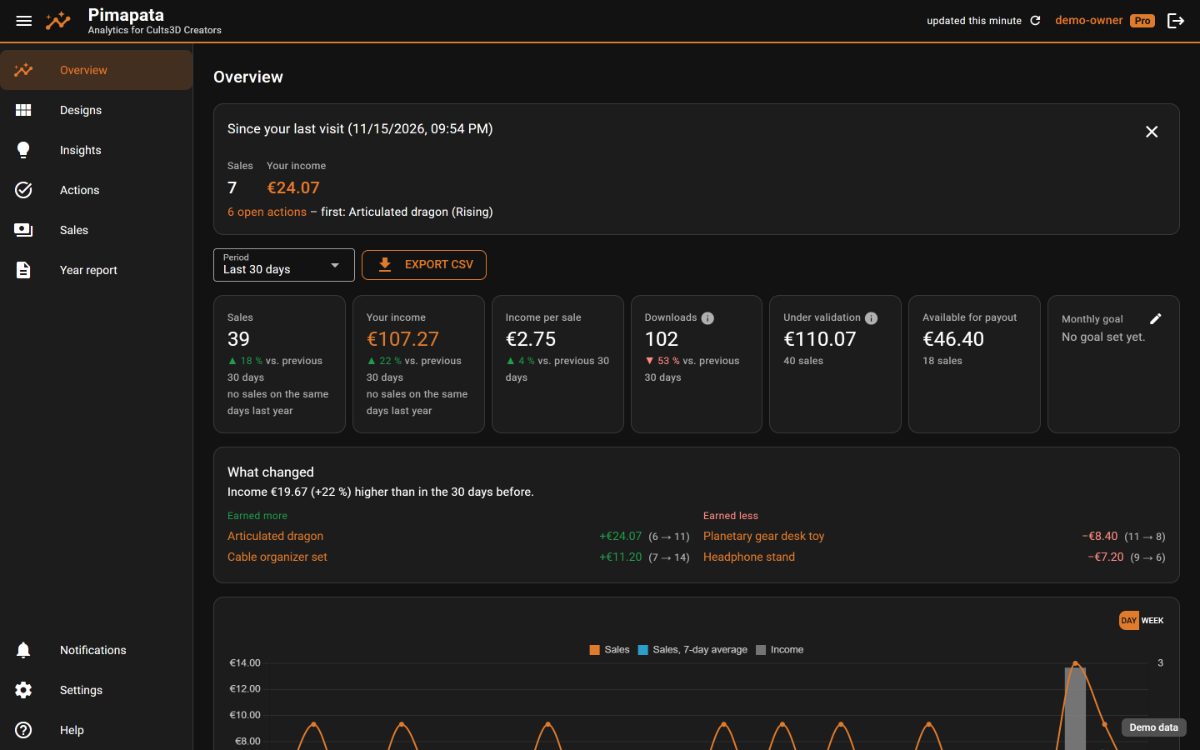
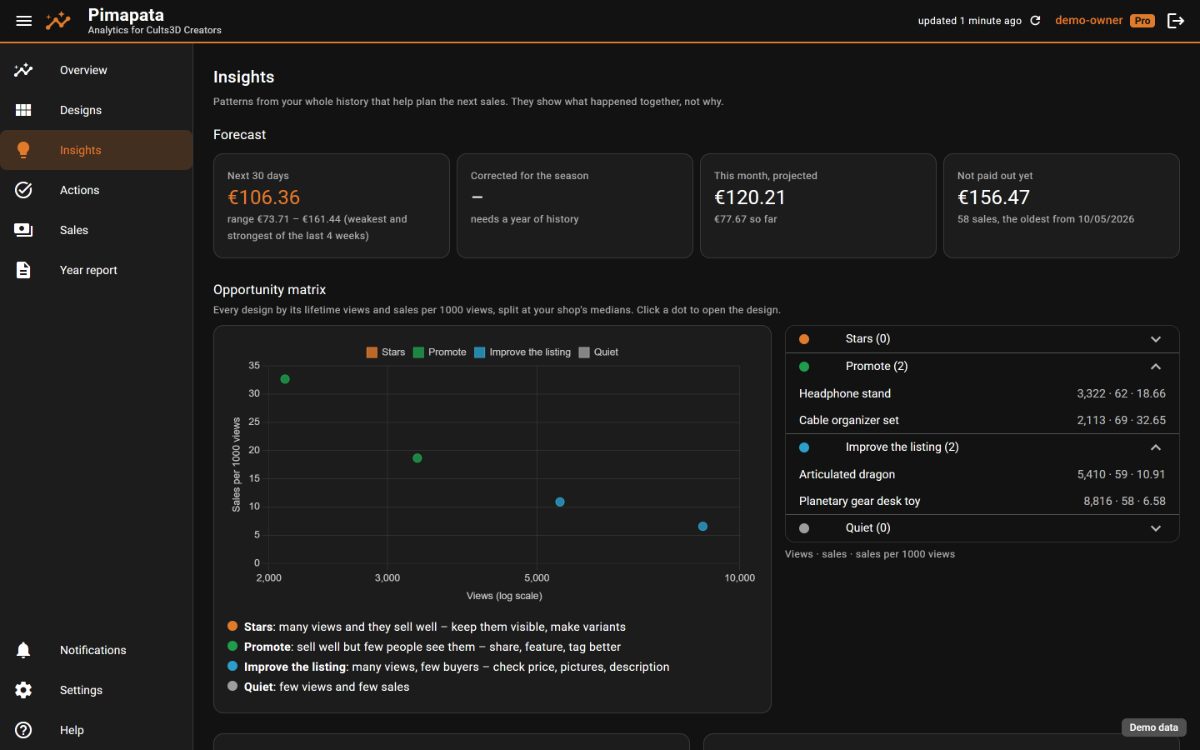
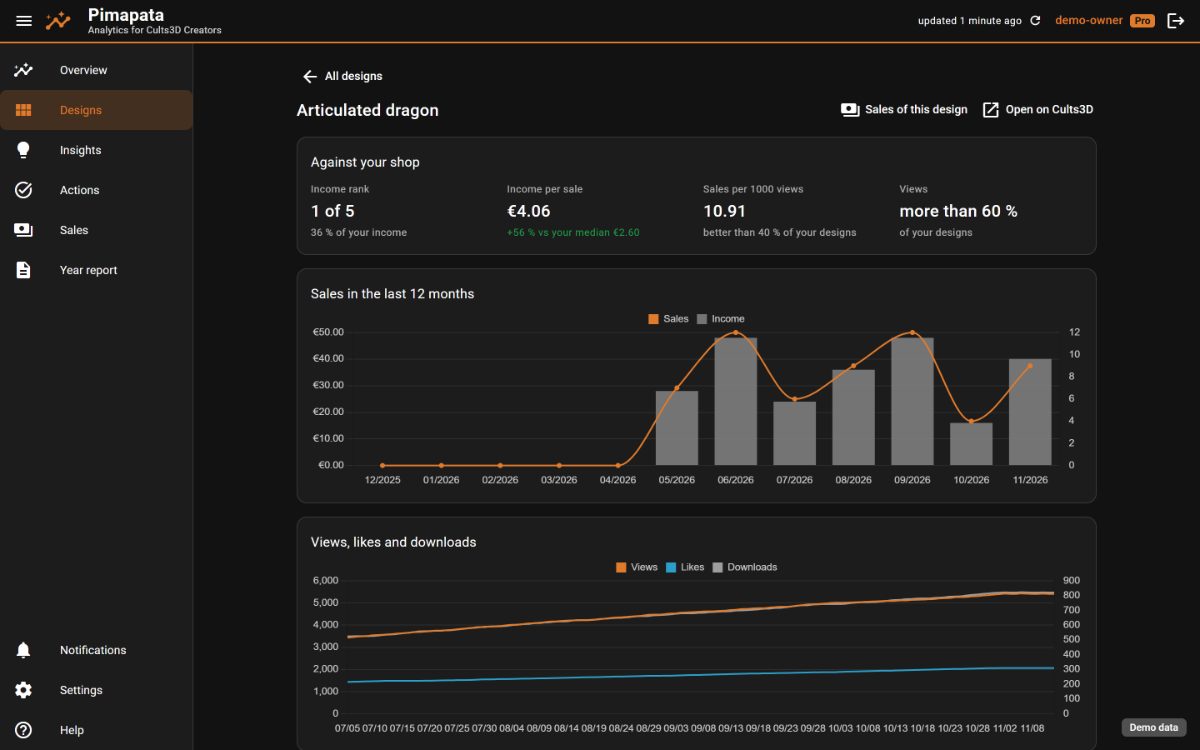
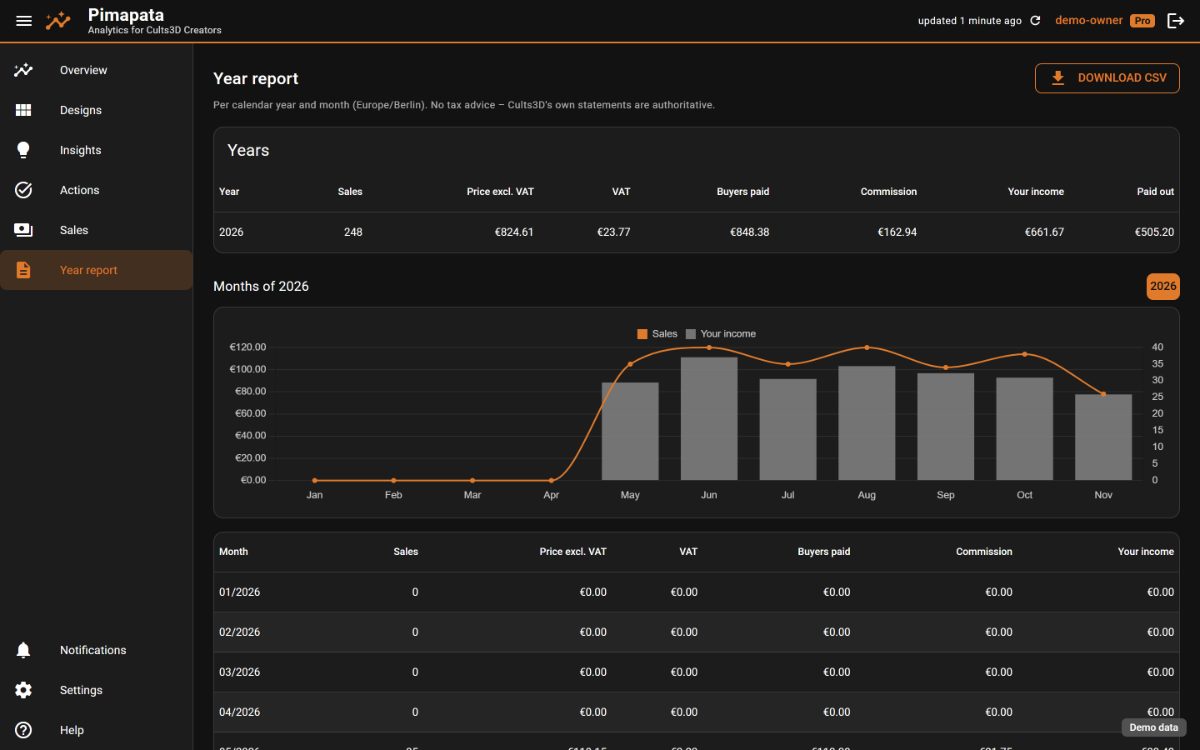
Screenshots show a demo shop with invented figures.
How it works
- On cults3d.com open My settings → API and add a key with READ access only.
- Open Pimapata and log in with your Cults3D nick and that key – there is no separate account or password.
- Press “Start collecting”: your designs and your whole sales history are read at once, then once a day.
Free and Pro
Everything about your own shop is free, for as long as you like: overview, designs with 12 months of history, all sales, payouts, year report, notes, a monthly goal and the descriptive insights.
What Pro adds
- Actions – a to-do list from your data, checked again 30 days later.
- Forecast and opportunity matrix – the next 30 days, and which designs to promote or improve.
- What changed – which designs earned more or less than before, and the same days last year.
- Launch curve, categories and tags, buying times, price effects and bundles.
- Weekly tag search ranking – where your designs appear when buyers search their tags.
- Market – each of your designs against similar paid designs on Cults3D (shared tags): price, sales per 1,000 views, demand and supply per tag, and niches worth a new design. No shop is named.
- The whole history and a refresh every hour (free: 12 months, once a day).
- Push notifications on your phone or computer when new sales arrive.
Pro as a gift
Pro is my thank-you to the people who buy my scale-model designs on Cults3D. When you buy in my Cults3D shop with the same Cults3D account you use in Pimapata, Pro comes with it: the amount shown in Pimapata's settings brings a month, more brings more days, and smaller purchases add up. Pimapata notices a purchase usually within a day, and your Pro days start then. Pimapata itself costs nothing – no subscription, nothing renews by itself.
Your data stays yours
Your key is stored encrypted and used only to read your shop. Your buyers' names are not stored – only the country of an order. “Delete my data” in the settings removes everything at once, and you can delete the key on Cults3D at any time. Pimapata is hosted in the EU.
Questions
Is Pimapata free?
Yes. Everything about your own shop is free: overview, designs with 12 months of history, all sales, payouts, year report and the descriptive insights. Pro adds tools that explain and decide; it is my gift to the people who buy my scale-model designs on Cults3D.
Can Pimapata change anything in my Cults3D shop?
No. You log in with a read-only Cults3D API key; a key that could change your shop is refused. Pimapata only reads your data.
Is Pimapata made by Cults3D?
No. Pimapata is an independent app made by a Cults3D designer and is not affiliated with or endorsed by Cults3D. It uses the public Cults3D API.
Where do I get the API key?
On cults3d.com open My settings → API and add a key with READ access only, then log in to Pimapata with your Cults3D nick and that key.
Does it show my history from before I started?
Your complete sales history, yes. Views, likes and downloads: Cults3D only reports today's totals, so their history starts on your first day in Pimapata. Since 27 December 2025 Cults3D also records views at every sale, and Pimapata uses those readings too.
Does it work on my phone?
Yes. Pimapata runs in the browser and can be installed like an app on Android, iPhone and computers, without an app store. It is in English, German and Ukrainian.
How can I see the statistics of my Cults3D shop?
Log in to Pimapata with your Cults3D nick and a read-only API key. It reads your designs and your whole sales history at once, then every day, and shows sales, income, payouts, views, likes and downloads per day, week and month.
How do I track the views and downloads of my Cults3D designs over time?
Cults3D only shows today’s totals. Pimapata records the views, likes and downloads of every design each day, so you see how each design develops, which ones gain views and which views turn into sales.
Can I export my Cults3D sales, for example for taxes?
Yes. The year report lists price, VAT, commission and your income per year and month, and downloads as a CSV for your spreadsheet or tax adviser. It is no tax advice; Cults3D’s own statements are authoritative.
Which designs sell best, and which tags work?
Pimapata ranks your designs by sales and by sales per 1,000 views, shows rising and fading designs, and compares categories and tags. Once a week it also checks where your designs appear when buyers search their tags.